 FitHome
How to start working out at home: a 2-week beginner guide
A step-by-step beginner guide to working out at home with FitHome: setup, your first session, a two-week routine, rest days and tracking progress.
Starting to work out at home sounds simple. You have a floor, you have some time, and you don't need to drive anywhere. Then the questions arrive. What should I do? How long? How many days? What if it's too hard? Most people who stop in the first fortnight don't stop because they're lazy. They stop because they didn't have a plan small enough to keep.
This guide is that plan. It walks through your first two weeks of home workouts with FitHome, step by step: the one-minute setup, your first session, the days in between and how to tell whether it's working. Each step comes with a short clip from our feature tour, so you can see the screen before you get there.
You don't need equipment, an account or an internet connection for anything below. If you'd like the short version first, the tour is also on YouTube (link at the end).
Before you start working out at home
A little preparation makes the first session much easier. None of it costs anything.
- Find a space about the size of a yoga mat. Enough room to lie down and stretch your arms out. A mat is nice but optional.
- Wear shoes or go barefoot on a non-slip floor. Socks on tiles are a bad idea for jumping jacks.
- Have a chair and a clear wall nearby. A few moves can use them, and they make easier variations possible.
- Pick a time you can repeat. Morning, lunch break or after work. The same time each day is easier to remember than "when I feel like it".
- Keep water close by.
FitHome is general fitness guidance, not a medical app. If you have a health condition, an injury, or haven't exercised in a long time, check with a doctor before you start. Stop any exercise that causes pain.
Step 1: set up FitHome in about a minute
When you open FitHome for the first time, there's no sign-up screen. It goes straight to a short setup called Your plan:
- Choose your language. FitHome has 20, and you can change it later in Settings.
- What's your main goal? Lose weight, Build muscle or Keep fit. FitHome uses this to recommend workouts.
- How fit are you today? Pick Beginner ("New to training or getting back into it") if you're unsure. You can change it any time.
- How many days a week? The app's own advice is the right one: "Pick a target you can keep. Consistency beats intensity." For your first two weeks, three days is a good start.
- Your body (optional). Height and weight are used only for BMI and calorie estimates. Skip it if you prefer.
- Your coach. Choose how the workout player guides you.
- Anything to avoid? (optional). Sensitive knees, wrists, shoulders or lower back, no jumping, or standing only. Workouts swap those moves out automatically.
- Daily reminder. A nudge at the same time every day.
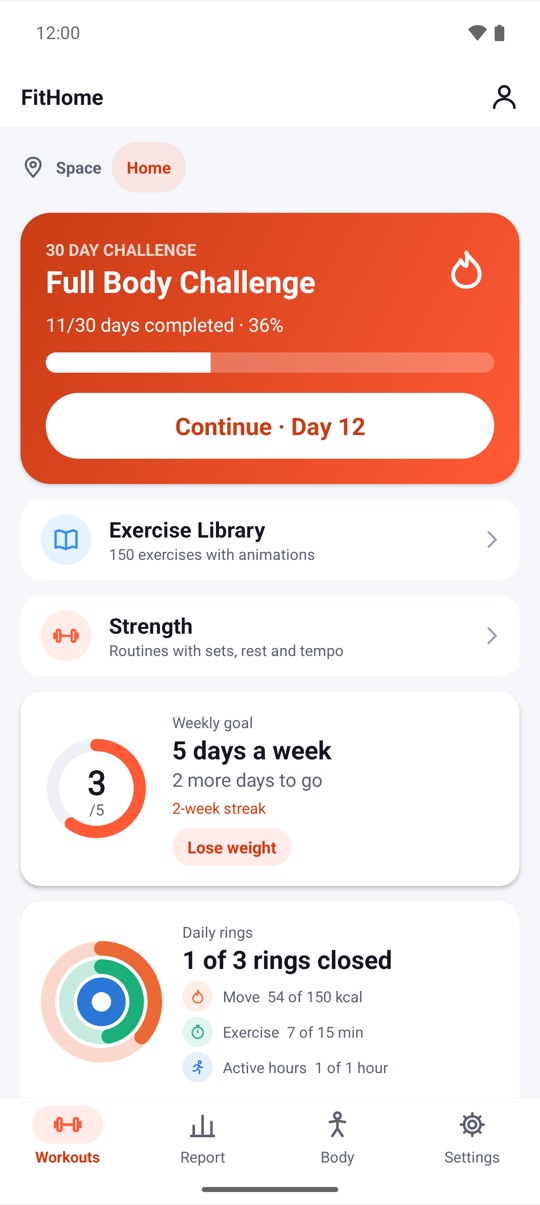
When you tap Finish setup, you land on the Workouts screen. The clip above shows what it looks like a few weeks in: the 30-day Full Body Challenge, your weekly goal ring and today's daily rings. Yours starts empty, and that's fine.
If you have sensitive joints or live above someone, take a moment on step 7. Workouts that respect your limits explains exactly what each switch does.
Step 2: your first home workout (day 1)
Your first session has one job: to be finished. Not to be hard.
Pick a Beginner plan, for example Full Body Beginner, or tap the 30-day Full Body Challenge and start day 1. If you don't want to choose at all, open Find a workout and use Quick start: pick 10 minutes, Full Body and no equipment, then tap Build and start. Today's mix, Quick start and programs covers these options in more detail.
Before the first exercise, FitHome asks "Warm up first?" with a 3-minute warm-up. Say yes. It gets your joints ready, and it's a good habit to build from day one.
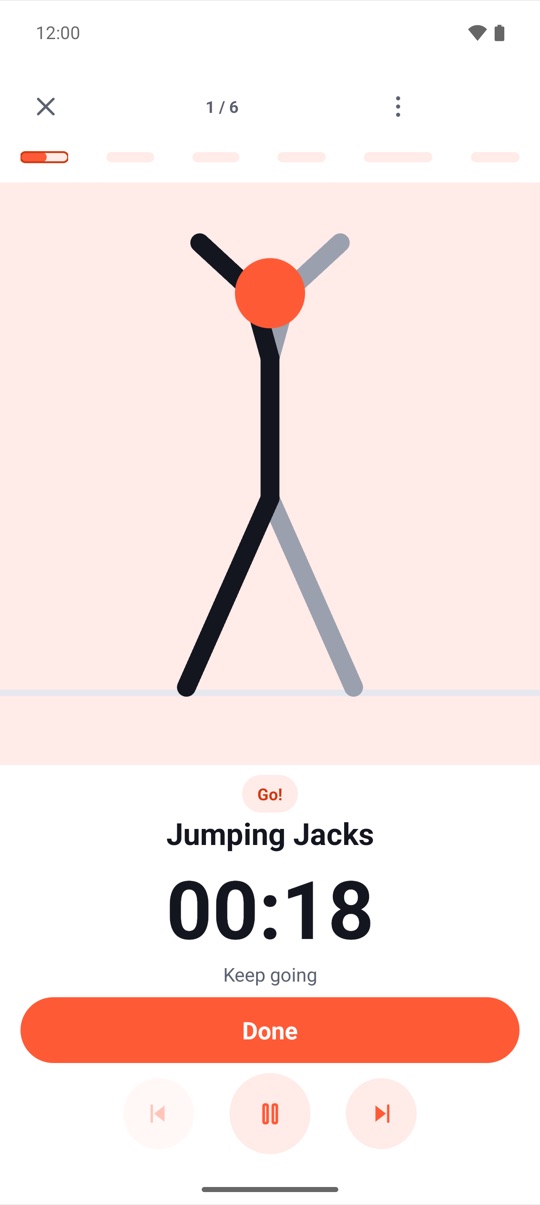
Then the workout player takes over. Here's what you'll see and hear:
- An animated guide at the top shows how to do the move. Watch one full loop before you copy it.
- A big timer or rep count tells you how long is left.
- A voice coach counts reps, times your rests and says what's next. If you'd rather not hear a voice, beeps and vibration mark each step.
- Done, pause and skip buttons sit at the bottom.
The player keeps running in the notification and on the lock screen, so you can put the phone on the floor and train.
A few beginner tips for day 1:
- Slow is fine. Good form at half speed beats sloppy form at full speed.
- Rest when you need to. Pause the player. Nobody is watching.
- Use easier versions. Knee push-ups instead of full push-ups, a chair for support, smaller steps instead of jumps.
- Take the cool-down. At the end, FitHome offers a 3-minute cool-down. Do it.
After a built-in plan, FitHome asks how it felt: Too easy, Just right or Too hard. Answer honestly. The next session of that plan is scaled up or down by about 10% based on your answer.
Step 3: rest days are part of the plan (day 2)
The day after your first workout, your legs may feel it. That's normal. With a three-day weekly goal, day 2 is a rest day, and resting is part of getting fitter.
Resting doesn't have to mean doing nothing. On rest days FitHome suggests something easy: "Recover actively: 8 minutes of mobility or 3 minutes of breathing." The Breathe tool on the Workouts tab has guided patterns like Box 4-4-4-4 and Relax 4-7-8. Breathing and rest days explains how they work, and those recovery minutes are counted separately from training.
What to do on day 2:
- Go for a walk if you can.
- Try 3 minutes of breathing or 8 minutes of mobility.
- Check your Report tab. Your first workout is already there.
Step 4: the rest of week 1 (days 3–7)
For the rest of the first week, keep it simple: two more sessions, with a rest day between them. A pattern like Monday, Wednesday, Friday or Tuesday, Thursday, Saturday works well.
You have three easy ways to choose what to do:
- Keep going with the 30-day challenge. Tap Continue · Day N on the challenge card. Every 4th day is a rest day, so the plan already spaces things out for you.
- Repeat a Beginner plan. Doing the same session twice in a week is a good way to learn the moves.
- Try Today's mix. A fresh session generated for today from your level, your limitations and what you've done recently. If you don't like it, tap Shuffle (up to three times a day).
If you're short on time or energy on a given day, don't skip. Adapt instead. Every plan page has Adapt today chips such as Short on time (about half the exercises) and Low energy (25% fewer reps and seconds, 25% longer rests). They change only today's run, never the saved plan. Adapt today, pace and the workout buddy has the full list.
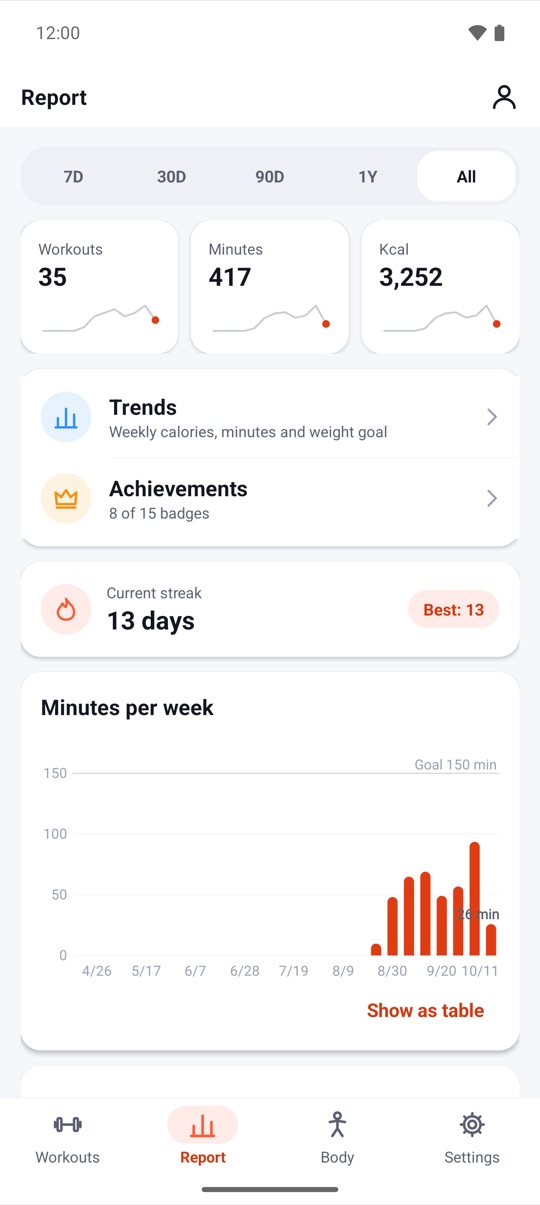
By the end of week 1 you'll have something to look at. The weekly goal card on Home fills its ring as you train ("3 of 3"), and the Report tab adds up your workouts, minutes and calories. The clip above uses sample data, so your numbers will be smaller. Three sessions in a week is a real result.
Step 5: week 2, build the habit (days 8–14)
Week 2 is where home workouts either become a habit or quietly stop. The goal isn't to train harder. It's to show up again on the same days.
- Keep the same three days. Same time if you can. Let the daily reminder do the remembering.
- Watch the feedback. If you answered "Too easy" after a plan, it has already been adjusted. Three "too easy" answers in a row suggest moving up a level. You don't need to do that yet.
- Add one small extra if you want. A 2–5 minute Desk break session on a work day, or a second short Quick start session. Extras are optional.
- Learn one new move. Open the Exercise Library (150 exercises with animations and step-by-step tips) and read up on a move that felt awkward.
FitHome's streak counts weeks, not days. A week counts when you reach your weekly goal, so Monday, Wednesday and Saturday count just as much as three days in a row. If a week goes wrong later on, shields and Pause my plan protect your streak. Weekly streaks, shields and Pause my plan explains how.
Step 6: see your progress after two weeks
After two weeks, open the Report tab and the Body tab. This is where small sessions turn into something you can see.
- Totals: workouts, minutes and calories, for 7 days, 30 days or longer.
- Active days: a heatmap of the days you trained.
- Minutes per week: bars against the goal line you set.
- Weight trend: if you log your weight on the Body tab, you'll see it with a 7-day average and your distance from your goal weight.
- BMI calculator: from the height and weight you entered.
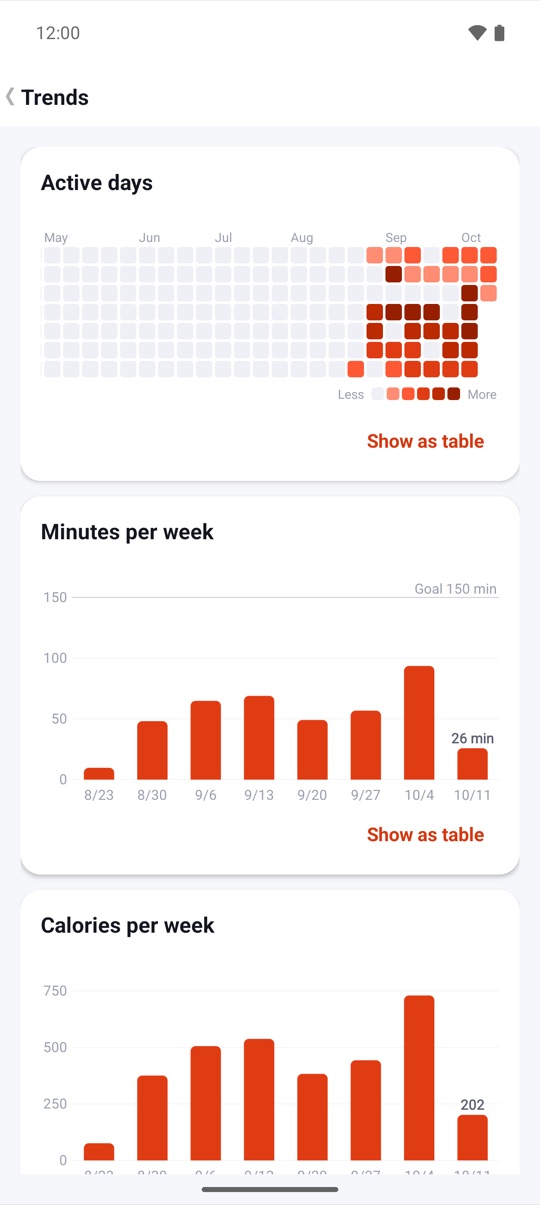
Two weeks is too short to judge weight or fitness. What it does show clearly is consistency, and consistency is what changes the rest. For a real fitness comparison, take FitHome's 8-minute fitness test now and again in four weeks. A fitness test every four weeks explains how it works.
Step 7: what to do after the first two weeks
Once three sessions a week feel normal, you have a few ways to grow:
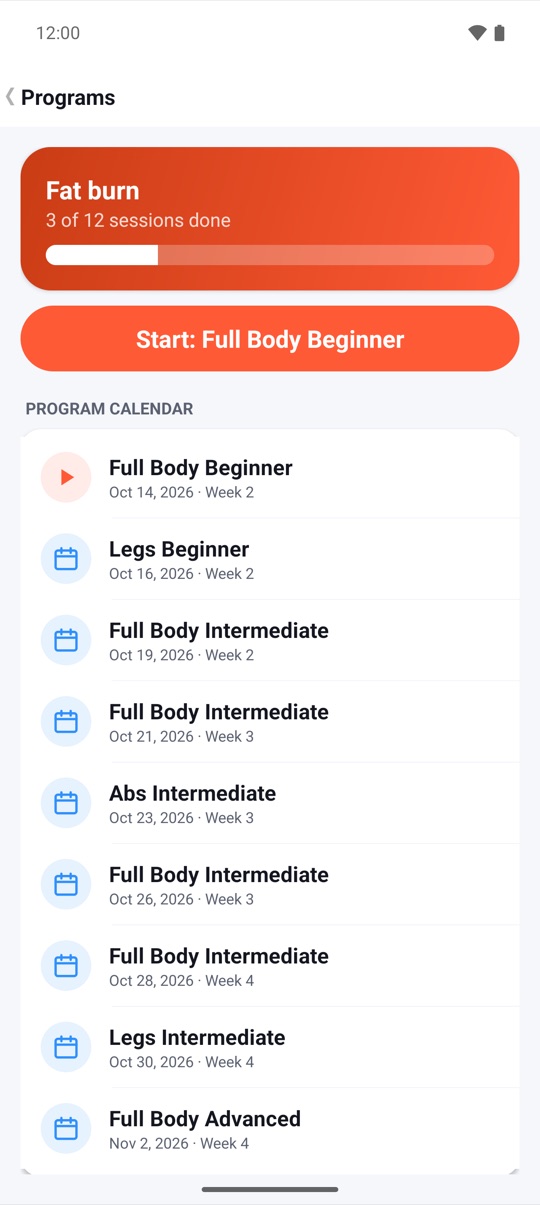
- Start a program. Fat burn, Strength, Core or Mobility: four weeks, three sessions a week, on the weekdays you choose. If you miss a day, the session simply moves to your next training day.
- Finish the 30-day challenge. Completing it earns the Champion badge.
- Add a fourth day. Change your weekly goal in Settings, but only when three feels easy.
- Try strength training. If you get dumbbells or a barbell later, the Strength routines log every set, with a rest timer and hints when it's time to go up.
For strength days, Focus mode turns the screen into one big timer on a dark background, readable from across the room.
Strength training with a per-set focus timer is the next read once you get there.
Your two-week home workout plan at a glance
Here's the whole fortnight on one screen, assuming a three-day weekly goal:
- Day 1: setup, warm-up, a Beginner plan or challenge day 1, cool-down.
- Day 2: rest. Walk, or 3 minutes of breathing.
- Day 3: challenge day 2, or repeat your Beginner plan.
- Day 4: rest or 8 minutes of mobility.
- Day 5: Today's mix or the next challenge day.
- Days 6–7: rest. Look at your Report tab.
- Days 8–14: the same rhythm. Same days, same time. Use Adapt today instead of skipping.
- Day 14: check Report and Body, and take the fitness test if you'd like a baseline.
Watch it on your phone
The vertical cut of the tour is made for a phone screen:
Watch on YouTube: the full feature tour and the Short. The product page has both films, every store screenshot and how to get FitHome. If you'd like to know why there's no account to create, read why FitHome works offline, with no account.
FAQ
How many days a week should a beginner work out at home?
Start with a number you can keep. FitHome's setup says it plainly: consistency beats intensity. Three days a week, with rest days in between, is a sensible start for most beginners. You can change your weekly goal later in Settings.
How long should my first home workouts be?
Short. A Beginner plan, a 30-day challenge day or a 10-minute Quick start session is enough. Add the 3-minute warm-up and cool-down that FitHome offers, and you're done in under 20 minutes.
Do I need any equipment to start?
No. Every plan uses your body weight, and a chair or mat is optional for a few moves. Quick start lets you set equipment to "none". Dumbbells and barbells only matter if you later move on to the Strength routines.
What if a workout is too hard?
Use easier variations, pause when you need to, and answer "Too hard" when FitHome asks how it felt. The next session of that plan is scaled down. On a bad day, the Low energy chip under Adapt today makes just that session easier.
Do I need an account or internet to follow this guide?
No. FitHome has no account and no internet permission. Everything in this guide works offline, on Android 4.3 and newer phones, tablets and Android TV.
Is FitHome safe if I have an injury?
FitHome is not a medical app. My limitations can swap out moves that load sensitive joints, but it's a filter, not an assessment. Check with a doctor or physiotherapist before starting, and stop any exercise that causes pain.